45 / 100 SEO Score
Big Blue bookkeeping

How it works

How does Outsourced bookkeeping work?

One of the most persistent worries that clients have while outsourcing their financial services to a provider is

  • Whether they have the right structure, resources, experience, ethics and expertise to provide improved results?
  • What is the work methodology tailed by the outsourcing company, and if they can expect better outcomes or not?

Outsourced bookkeeping is quite similar to having an in-house bookkeeper. The only difference is that the bookkeeper is virtual and working from a remote location. You can use email (most popular), instant messenger (skype) to communicate with our virtual bookkeeper. 

Big Blue is one of the foremost outsourcing service providers of bookkeeping services. We follow an efficient steps for outsource bookkeeping services to make sure that our services are delivered right on time at most competitive rates.

Step 1 - Contact us

You fill the get started form: We have an easy to fill form to allow us to get your details for faster and easier communication. These include your name, business name (for businesses), contact details, Plan you want, and also you can fill business details and nature of the services in message field.

Our sales team calls or emails you: We have a team working around the clock and we guarantee the fastest response after you contact us. We will send you an email within minutes to know your bookkeeping requirements over the email, send our simple services agreement, and get you started the same day!

Our representatives are highly experienced bookkeepers and are keen to listen to the client to understand their needs and provide the best solutions.

big-blue-bookkeepinghelps.com Step 2 - Choose the QuickBooks option

Our virtual bookkeeper uses his/her own desktop computer to perform tasks or uses remote desktop software to logon to your computer and perform tasks. 

Below are the options available for QuickBooks Bookkeeping outsourcing using a virtual bookkeeper.

Local Option - Quickbooks v Services done on our computer
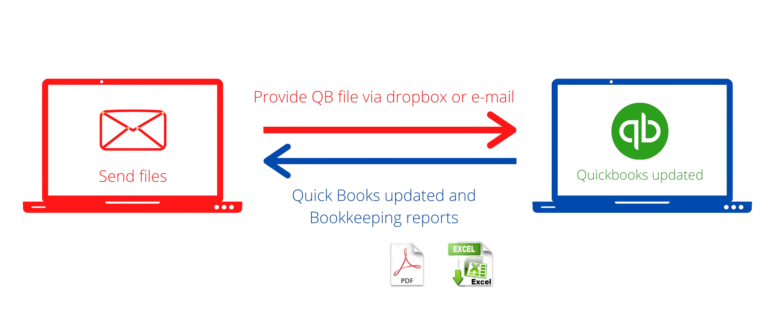
  • You provide us an initial copy of your QuickBooks file (QBM, QBW).
  • You send us the invoices, statements and other documents via email or dropbox. Or we get this information directly from bank/vendor websites.
  • Our Quickbooks specialist will regularly update QuickBooks file on our desktop.
  • Our QuickBooks specialists will regularly backup the QuickBooks file to the shared folder on dropbox or send via email.
  • Our QuickBooks specialists will send you periodic bookkeeping reports via email in Excel or PDF format.

Remote-Access Option - QuickBooks updates done on your computers
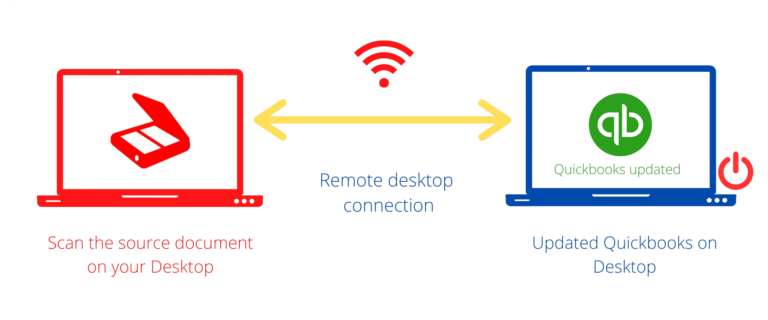
  • We connect to your computer over the Internet using Remote Desktop.
  • You scan the source documents to your computer’s desktop.  Or, we get this information directly from vendor and bank web sites, and save to your desktop.
  • Our QuickBooks specialists will work with you to setup access to QuickBooks on your desktop.
  • Our QuickBooks specialists will update QuickBooks on your desktop and logout.

Online Option - QuickBooks Bookkeeping done on using QuickBooks online
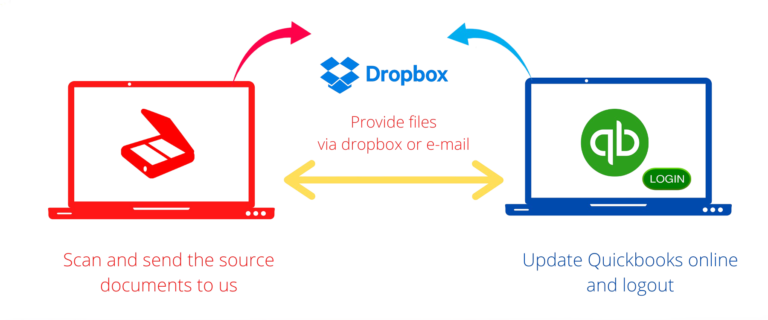
  • You send us the invoices and other documents via email or dropbox. Or, we get this information directly from vendor and bank web sites.
  • We login to to your QuickBooks online account using a user ID and password you provide us.
  • Our QuickBooks online specialists will update QuickBooks online and logout.

clipart3538118 Step 3 - Choose the Plan and Pay

After selecting the QuickBooks option, choose the plan that suits for you..For more details about the Plans visit our Plans and Pricing page.

Once you selected the plan, our sales team will send you an Invoice accordingly. You can pay via debit/credit cards. You can amend the plan on anytime with out any charges. Also, if you need any plan that needs to be customized, you can let our team know. Our team will send you further updates.

big-blue-bookkeepinghelps.com Step 4 - Work updates

Once you have paid the invoice, our team will send you the welcome email, and you can start to share the documents (Invoices, bills, bank/cc statements, reports, other docs.) either through email or Dropbox (will be provided). 

In fact, you can send all your emails to the email address to communicate with our team. We will send you the periodic bookkeeping reports via the group email and also upload it in Dropbox.

Things that we need from you

The documents are helpful for the bookkeeper to ensure that end of the year financial process is completed. If this information is not provided, or accounts are not reconciled, the time required and therefore the cost of preparing the financial statements may increase substantially. We will be glad to assist you!  

Big Blue bookkeeping provides a wide range of online bookkeeping services to small businesses, and CPA firms; committed to providing excellent and timely services to the clients with complete accountability and dedication.

Updates & Reconciliations

  • Bank statements for the financial year or prior years depends on the plan.
  • Credit card statements
  • Line of credit or Loan statements (if there)
  • Cash on hand report
  • Cash receipts (if you want us to track)
  • Deposit slips
  • Check stubs
  • Personal bank account if business transactions made via personal account
  • Investment activity statement (if it is under business name)
If you want us to go back and do some catch up work for prior years, then we would need prior year statements and documents for the requested above. Also, you can share your bank/cc view only access login to us to keep track of checks, deposit slips and retrieve bank/cc statements to reduce your part of work. 

You can mark and share your personal bank/cc account statements, if the business payments were made via personal accounts. You can share Investment activity statement if it is running under the business name. 

Accounts Payable

  • Vendor details (W9)
  • Bills
  • Payment details (checks, EFT or ACH)
  • Vendor Statement
  • Other supporting documents.

If you’re paying vendors in bill.com, you can also share a user access to us to update and post bills to bill.com. We post and update bills in bill.com and you can approve the bills and pay.

Accounts receivable

  • Customer details
  • Customer invoices
  • Customer payment details.
  • Other supporting documents.

Other documents/reports

Also, you can share below statements/reports to reconcile the QB accounts., if you’re tracking this and want us to track.

  • Shopify finances summary
  • Stripe balance summary report
  • Amazon summary report
  • Merchant statements
  • Sales tax payment details
  • Other documents (if you like to track)
Free Estimation

Request A Quote

For more information feel free to email us on info@bookkeepinghelps.com or fill out the form. Our sales team will contact you soon via email.